Build a scenario that waits, lists pods in a namespace, and returns a clear
result. Start with a plugin skeleton in its own repository, add two methods,
package the plugin in a Krkn image, and expose it to Krkn Operator through a
private registry running inside Kind.
Get the lab files:krkn-chaos/krkn-dev-demo.
The commands below pin revision bf2ea8d,
including the executable-script and containerd configuration fixes used in this
walkthrough.
This lab focuses on the integration contract. The scenario reads Kubernetes
resources and does not disrupt workloads. You provide the target cluster and
register it with the operator separately; this lab creates only the Kind
management cluster that hosts the operator and registry.
What you will build
DevDemoScenarioPlugin, discovered as dev_demo_scenarios.
A custom Krkn base image containing that plugin.
A scenario image exposing wait and namespace through OCI labels.
An authenticated registry, installed with Helm inside Kind.
An operator run whose logs show the development banner and target pod names.
The plugin is built directly into the custom base image. There is no krkn-hub
checkout in this workflow, and the image metadata supplies the client-facing
parameter definitions.
Before you begin
Install Git, Podman, Kind, kubectl, Helm 3, jq, envsubst from GNU gettext,
OpenSSL, and an htpasswd implementation supporting bcrypt (-B). Have Python
3 available for the optional source syntax check. On macOS, start Podman Machine
and use a rootful Podman connection for this Kind lab.
You also need:
Internet access to clone the source and pull the published images and charts.
A running cluster and kubeconfig for the local container test. If it is a
Kind cluster, know its name from kind get clusters.
Free host ports 5001 for the registry and 3000 for the console forward.
An operator target whose Kubernetes API is reachable from the management
cluster’s scenario Pods. Registering that target is outside this lab.
The examples use Kind node image kindest/node:v1.32.2 with containerd 2,
Docker Registry chart 3.0.0, and Krkn Operator chart 1.1.2. These are the lab’s
version choices, not a claim that they are the latest releases. The companion
repository is pinned below so the permission and registry fixes demonstrated
here are included.
Prepare the workspace
Run these commands in one shell and keep its exported variables for the whole
lab. Paths are absolute, so later commands do not depend on the current working
directory. Start from /tmp in case a previous shell was left inside a removed
checkout.
export makes the paths and image names available to child processes. Quoting
the paths preserves them as single arguments. git -C runs Git inside the
plugin checkout without changing your shell’s directory, and checking out a
commit selects the lab’s exact files in a detached HEAD. Create your own branch
there if you want to commit your implementation. KIND_EXPERIMENTAL_PROVIDER
selects Podman for Kind; it does not start Podman Machine or change its connection.
Use an unused KRKN_DIR. If /tmp/krkn already contains work, choose another
absolute path before cloning. Do not remove an existing checkout to make the
command succeed.
The pinned plugin repository is a separate checkout nested inside Krkn’s plugin
directory. It contains:
dev_demo/
├── __init__.py
├── dev_demo_scenario_plugin.py  # helper implemented; abstract methods left for you
├── scenario.yaml               # example plugin input
├── scenario.yaml.template      # environment-to-YAML template
├── env.sh                      # container defaults
├── run.sh                      # render configuration and start Krkn
├── krknctl-input.json           # user-facing input descriptors
├── Dockerfile.base             # add the plugin to a published Krkn runtime
├── Dockerfile.template         # package the scenario contract
├── kind-config.yml             # registry port and containerd hosts directory
└── registry-values.yml         # authenticated registry Helm values
The cloned Krkn source lets you inspect its interface and loader. The base image
build copies the plugin into the published Krkn runtime; it does not rebuild
the rest of the cloned engine. Pin the published base image as well when turning
this workshop into a repeatable release pipeline.
Keep Troubleshooting
open while working. It covers the failures encountered while developing this
demo, including successful discovery followed by an HTTPS image pull error.
1 - Implement the Plugin
Complete the abstract interface and connect a scenario YAML file to krkn-lib operations.
Starting point: complete the workspace setup.
Result: a concrete plugin class that Krkn can discover and execute.
Read the prepared behavior
Open $KRKN_DEV_PLUGIN_DIR/dev_demo_scenario_plugin.py. Its
DevDemoScenarioPlugin class already implements execute_demo(scenario, lib_telemetry). The method:
Reads the YAML file identified by scenario.
Requires wait to be an integer from 0 to 60, and namespace to be a
nonempty string. A YAML boolean is not accepted as an integer.
Sleeps for the requested duration.
Obtains the Kubernetes helper from lib_telemetry and checks namespace
existence with list_namespaces().
Lists pods with list_pods(namespace) and logs a distinctive banner.
Returns 0 on success and 1 on a missing namespace or another failure.
The input file is intentionally small:
wait:2namespace:default
The helper uses the cluster client already initialized by Krkn:
kubernetes=lib_telemetry.get_lib_kubernetes()ifnamespacenotinkubernetes.list_namespaces():logging.error("Development scenario: namespace '%s' does not exist",namespace)return1pods=kubernetes.list_pods(namespace)
Checking the namespace list avoids intentionally triggering the library’s
verbose read_namespace_status error path for a missing namespace. This demo
therefore requires permission to list namespaces as well as pods. An existing
namespace with no pods is a successful result and is logged as (none).
Implement the two abstract methods
Ensure these imports are present once at the top of the file:
Paste the following methods inside DevDemoScenarioPlugin, at the same
indentation level as execute_demo(). The four-space class indentation is
included for copying:
get_scenario_types() supplies the configuration key that selects this class.
run() delegates to the helper, which contains the validation and exception
handling. The framework supplies the run identifier and telemetry record even
though this small helper does not need to use them directly.
The class remains abstract until both methods are implemented. Avoid renaming
the package to dev_demo_plugin or dev_demo_scenario: those directory names
violate the factory’s naming rules. The module is
dev_demo_scenario_plugin.py and its class is DevDemoScenarioPlugin.
Understand the configuration binding
The main Krkn configuration selects the type and its scenario file:
The engine calls run(scenario="scenarios/dev_demo.yaml", ...). The plugin
opens that file and reads wait and namespace. The scenario type, file path,
and field names serve different purposes; changing one does not automatically
change the others.
For a source-based Krkn run, copy the sample and derive a dedicated main config:
Set the kraken.chaos_scenarios section in dev_demo_config.yaml to the example
above. The next part packages this same binding in the image’s startup script,
so a source-based run is optional.
py_compile compiles the file without importing it or contacting Kubernetes.
Successful execution normally produces no output and writes bytecode under
__pycache__. It catches syntax and indentation errors, but does not prove
abstract-method completeness, plugin discovery, or Kubernetes permissions.
Those checks follow in the container tests.
The plugin keeps a nonzero result meaningful: an invalid input or missing
namespace must not be converted into success just to keep the container running.
For a real chaos action, add restoration and rollback behavior appropriate to
the resources it changes.
Tip: Dockerfile path and build context are different
-f selects the Dockerfile; the final argument selects the directory available
to its COPY instructions. -t assigns a local image name. Keeping both paths
absolute makes this command work from any directory. Nothing is pushed to a
registry at this stage.
This build context is the plugin repository. Using Krkn’s upstream container
Dockerfile unchanged would clone Krkn from GitHub during the build and omit the
local plugin. If you change the core engine or krkn-lib, build a runtime that
includes those changes explicitly.
Inspect the scenario contract
The image has two user inputs in krknctl-input.json:
[{"name":"wait","short_description":"Wait (seconds)","description":"Seconds to wait before listing pods in the namespace (0 to 60).","variable":"WAIT_SECONDS","type":"number","required":"false"},{"name":"namespace","short_description":"Namespace","description":"Kubernetes namespace whose pod names will be logged.","variable":"NAMESPACE","type":"string","required":"true","validator":"^[a-z0-9]([-a-z0-9]*[a-z0-9])?$","validation_message":"namespace must be a Kubernetes namespace name"}]
name identifies the input presented by a client; variable is the environment
variable injected into the container. The string values "true" and "false"
match krknctl’s field descriptor format. The plugin still enforces its own
integer range: a generic number field alone does not restrict input to an
integer from 0 to 60.
Dockerfile.template embeds the JSON in krknctl.input_fields, together with
the other labels included in the companion image:
LABEL krknctl.is_a_scenario="true"LABEL krknctl.privileged="false"LABEL krknctl.has_rollback="false"LABEL krknctl.kubeconfig_path="/home/krkn/.kube/config"LABEL krknctl.title="Dev Demo"LABEL krknctl.description="Waits, then logs pod names from one Kubernetes namespace."LABEL krknctl.input_fields='$KRKNCTL_INPUT'
Tip: an image label does not configure a volume mount
krknctl.kubeconfig_path is metadata in this template; krknctl and the operator
do not use it to select the mount destination. The operator uses the run’s
kubeconfigPath or its default, /home/krkn/.kube/config, which this lab keeps.
With a custom path, align the run configuration, the mount, and the startup
script’s KUBECONFIG value. See Kubeconfig mount path.
The same Dockerfile copies the startup script with an explicit executable bit:
This permission is required because the operator invokes /home/krkn/run.sh
directly. A local entrypoint that passes the script to bash can conceal a
missing executable bit.
Follow the runtime configuration
env.sh supplies defaults of 2 seconds and namespace default for direct
container execution. The console still requires the namespace input declared
in the metadata.
scenario.yaml.template contains:
wait:${WAIT_SECONDS}namespace:${NAMESPACE}
run.sh changes to /home/krkn/kraken and uses an explicit substitution list:
It derives config/dev_demo_config.yaml from the base configuration, sets
kraken.kubeconfig_path from KUBECONFIG, and selects only
dev_demo_scenarios. For this focused demo, telemetry export, event backup,
reports, resiliency scoring, and the inter-scenario stabilization delay are
disabled. These are demo settings, not a requirement for custom plugins.
Finally it hands control to Krkn while preserving the process exit status:
Compact the JSON, expand only its build-time placeholder, and select the custom
base image in the generated Dockerfile. The runtime placeholders in the YAML
and shell files remain untouched.
Tip: substitute build metadata without expanding runtime inputs
jq -c converts the descriptor array into one line. The single-quoted argument
to envsubst allows only KRKNCTL_INPUT to be expanded; it does not expand
runtime fields such as WAIT_SECONDS. sed replaces the template’s first
FROM line with your custom base image. fromjson decodes the label back into
JSON so you can inspect the actual built artifact. The executable check must
exit successfully as UID and GID 1001, matching the operator’s runner.
Run against an existing Kind cluster
Set KRKN_TEST_CLUSTER to a running cluster you supply. This test does not
create or register an operator target.
Kind’s host kubeconfig normally uses a loopback address. A container on the
kind network needs the internal API address instead. Save that kubeconfig
under your home directory so Podman Machine on macOS can mount it. The temporary
directory is private; the mounted file is readable by container UID 1001.
--network kind makes the internal Kind API address reachable. Each -e
sets a container environment variable, while -v host:container:ro mounts the
kubeconfig read-only at the container path supplied in that argument.
KUBECONFIG tells the startup script where to read it. --user 1001:1001
tests non-root access. Overriding the entrypoint with bash -c 'exec ...'
executes run.sh directly, exposing a missing executable bit. --rm removes
the finished container; the subshell’s trap removes only the generated
kubeconfig directory when the test exits.
On a Linux host with SELinux enforcing, use :ro,Z for this dedicated temporary
kubeconfig mount if a label denial prevents access.
For a non-Kind target, use a kubeconfig whose API endpoint is reachable from
the container. Replace kind get kubeconfig ... with
kubectl --kubeconfig "$KUBECONFIG" config view --raw --flatten --minify and
omit --network kind. Flattening embeds certificate files; an external
credential plugin still needs to be available in the image.
Check both outcomes
For an existing namespace, expect container exit status 0 and a log block:
##### DEVELOPMENT SCENARIO #####
Namespace: default
Pods:
  (none)
##### END DEVELOPMENT SCENARIO #####
Pod names replace (none) when the namespace contains pods. Set
KRKN_TEST_NAMESPACE=dev-demo-missing-namespace to a namespace you have
confirmed does not exist and repeat the test. Expect a nonzero exit status and
a concise missing-namespace error. Do not create that namespace as part of
this failure-path test.
Host an authenticated registry inside Kind, configure containerd, and run the custom scenario through Krkn Operator.
Starting point: the scenario image passes its local tests.
Result: the operator discovers the image, renders its two inputs, and runs
it against a target you have already registered.
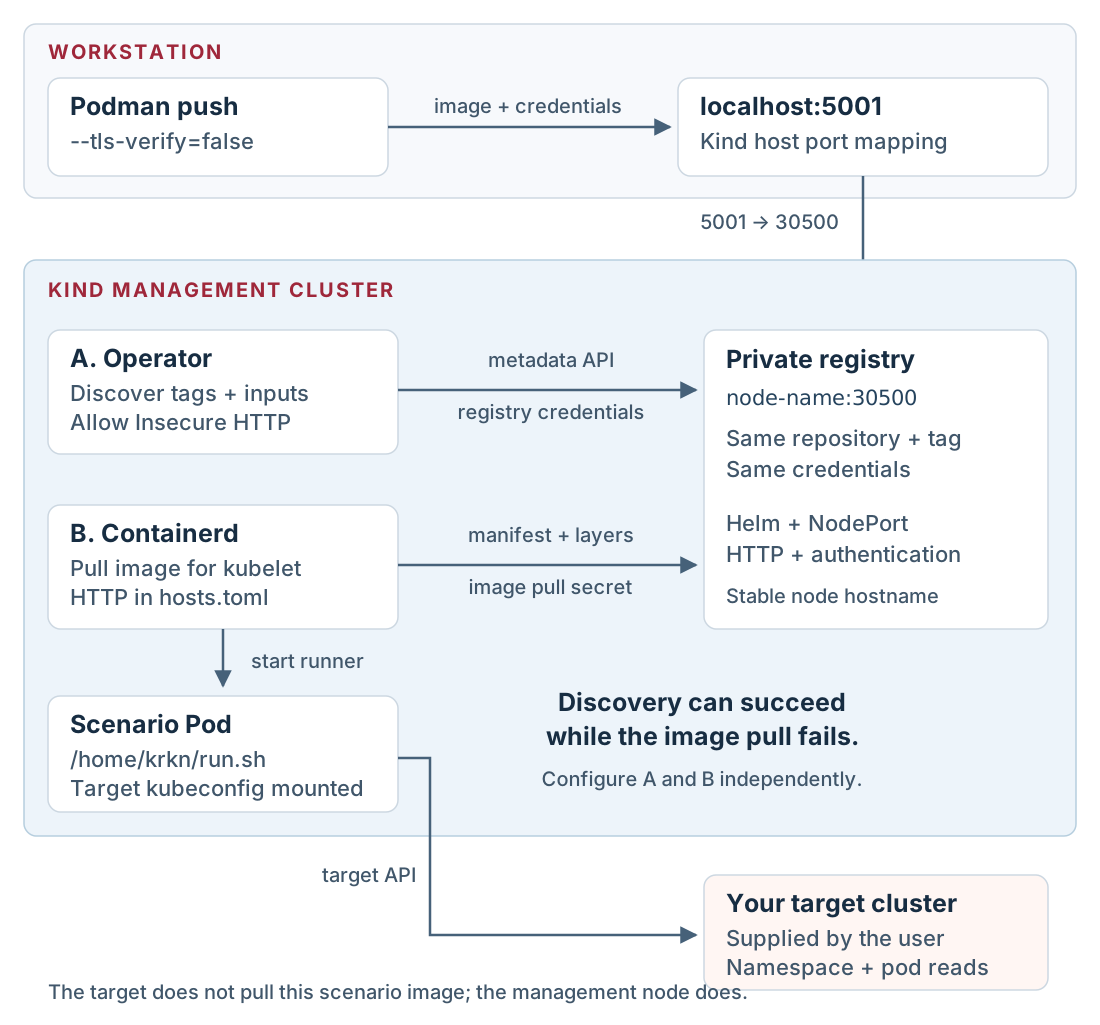
The management cluster hosts the registry, operator, and scenario Pods. The
target’s kubeconfig is mounted into each scenario Pod. You do not need to place
the private registry on the target or configure the target’s runtime to pull
this scenario image.
One registry, two client configurations. Select the diagram to view it at full size.
1. Create the management cluster
Use a dedicated name so an existing Kind cluster is preserved:
Tip: keep management operations on the intended cluster
kind create cluster --name creates the node container and a kubeconfig context
named kind-<name>. Explicit --context and Helm --kube-context arguments
keep later commands on that management cluster even if your current context
changes. --config reads the port mapping and containerd settings at creation
time; it is not a configuration file watched by the running cluster.
The port mapping is created with the node container. Editing this file does
not change an existing cluster. The containerd plugin key above is for the
containerd 2 runtime in this node image.
Tip: follow the registry's three ports
Podman publishes host port 5001 to port 30500 on the Kind node container.
The registry’s Kubernetes NodePort forwards 30500 to service port 5000.
listenAddress: 127.0.0.1 restricts the workstation listener to loopback.
Inside the cluster, clients use the node hostname and 30500, not the
workstation’s localhost:5001.
2. Install the authenticated registry
Keep generated credentials outside the checkout. Run the following in the same
shell so the registry credentials remain available for the push and UI setup:
openssl rand -hex 16 generates the demo password. htpasswd -Bbn writes a
bcrypt password entry to standard output, which is redirected into the private
state directory. Helm’s --set-file reads that file’s contents into the chart
value; it does not mount the workstation path. upgrade --install installs the
release or updates an existing one, and --wait checks readiness before
continuing. Keep the exported password for the Podman login and registry form.
The Twuni chart deploys Docker
Distribution. The demo values select NodePort 30500, service port 5000,
and persistence.enabled: false. Storage is disposable: replacing the registry
Pod or deleting the cluster can remove the pushed images. Use TLS and durable
storage for a registry outside this local lab.
Expect {}. An unauthenticated request should receive HTTP 401.
3. Configure image pulls on the management node
Use the node’s name on the Podman kind network as the registry address inside
the cluster. This avoids embedding an IP that can change after a Podman Machine
restart. The host continues to push through localhost:5001.
exportKRKN_MGMT_NODE="$(kind get nodes --name "$KRKN_MGMT_CLUSTER"| head -n 1)"exportKRKN_REGISTRY_URL="$KRKN_MGMT_NODE:30500"printf'Registry URL for the operator: %s\n'"$KRKN_REGISTRY_URL"for node in $(kind get nodes --name "$KRKN_MGMT_CLUSTER");doregistry_dir="/etc/containerd/certs.d/$KRKN_REGISTRY_URL" podman exec"$node" mkdir -p "$registry_dir"printf'server = "http://%s"\n[host."http://%s"]\n capabilities = ["pull", "resolve"]\n'\
"$KRKN_REGISTRY_URL""$KRKN_REGISTRY_URL"| podman exec -i "$node" sh -c "cat > '$registry_dir/hosts.toml'"done
Tip: configure the runtime inside the Kind node
Each Kind node is a container. podman exec writes its containerd configuration
inside that node, not on the workstation. The loop configures every management
node, and -i passes the generated TOML through standard input. The directory
name must exactly match the registry host and port used in the image reference.
The pull and resolve capabilities allow fetching image content and resolving
tags. Credentials remain in the operator’s pull secret, not this file.
The fresh cluster already has config_path enabled. Changes to the hosts files
do not require a containerd restart. For a cluster created with an older config,
follow Repair an existing node
before retrying a pull.
The registry URL, hosts.toml directory name, and operator pull secret must use
the same host and port. The operator’s Allow Insecure HTTP option affects
its registry API requests; this node configuration controls the actual pull.
Skip TLS Verification only changes certificate checks and does not enable
HTTP. See the containerd registry documentation.
Check that cluster Pods can resolve and reach the chosen hostname:
Expect HTTP 401: this probe intentionally sends no credentials. If hostname
resolution fails, fix the Kind/Podman network before registering the URL.
Tip: interpret the network probe
kubectl run --restart=Never creates a one-off Pod. --attach=true shows its
output and --rm removes it afterward. Curl discards the body and prints the
HTTP status. A 401 demonstrates DNS resolution, TCP connectivity, HTTP
transport, and an authentication challenge; it does not yet prove that the
image or supplied credentials are valid.
podman tag adds another local name to the already built image; it does not
rebuild it. push uploads that content to the registry. --password-stdin
reads the login secret from the pipe, and --tls-verify=false allows this local
HTTP endpoint. The operator uses a different address to reach the same registry,
so its credentials are configured separately in the next steps.
The response should list dev-demo. The repository is demo/krkn-hub; the tag
is the scenario identity. The operator accesses the same content as
$KRKN_REGISTRY_URL/demo/krkn-hub:dev-demo, using the internal address.
The first 3000 is the workstation port; the second is the service port.
kubectl port-forward selects a backing Pod and keeps the tunnel open while
the command runs. It does not create an Ingress or permanently expose the
console. Stop it with Ctrl+C when you finish the session.
Open http://localhost:3000, create the first administrator account, and sign
in. Keep the forward running. If you changed the cluster or namespace names,
use those names in the second terminal as well.
6. Register the image source
In Settings → Private Registries, add:
Name:dev-demo-registry.
Registry URL: the value of $KRKN_REGISTRY_URL, without http://.
Scenario Repository:demo/krkn-hub.
Authentication Type: Username & Password.
Username and password: the values of $REGISTRY_USER and
$REGISTRY_PASSWORD, not their variable names.
Allow Insecure HTTP: enabled.
Skip TLS Verification: disabled; this local registry serves plain HTTP.
Available to All Users: enabled for this dedicated demo installation.
For the default cluster name, the URL is
krkn-dev-demo-mgmt-control-plane:30500. The operator stores the credentials in
a Kubernetes pull secret. If you edit the URL later, use the registry form so
the stored URL and authentication host stay aligned.
The new custom image is unsigned. On the same settings tab, disable Image
signature verification for this dedicated lab installation. This setting is
operator-wide. Normal deployments should require signatures that the operator
trusts; adding an arbitrary signature is not sufficient. For the official
scenario collection, see mirroring signed images.
7. Run against your registered target
Provide a target through your usual operator setup. Its API must be reachable
from a scenario Pod in the management cluster, and its credentials must allow
listing namespaces and pods. This lab does not create or register the target.
In Run Scenario:
Select your registered target.
Choose the private registry dev-demo-registry.
Select dev-demo (display title Dev Demo).
Set Wait (seconds) to 2 and Namespace to an existing namespace.
Review the configuration and start the run.
In Jobs, inspect the resolved image, status, and logs. Expect the
##### DEVELOPMENT SCENARIO ##### banner, the selected namespace’s pod list,
and a successful result. An empty existing namespace is also successful.
Inspect the Kubernetes resources separately:
kubectl --context "$KRKN_MGMT_CONTEXT"\
-n "$KRKN_OPERATOR_NAMESPACE" get krknscenarioruns,pods
For the selected krkn-job-... Pod, use kubectl describe pod to inspect pull
events and kubectl logs to inspect plugin output. The current controller
creates Pods directly; kubectl get jobs can legitimately return no resources.
Tip: events and logs answer different questions
kubectl describe pod <name> shows scheduling, image pull, and container
startup events. kubectl logs <name> reads the process output after the
container has started. Use the management context and operator namespace for
both. An ImagePullBackOff failure usually has useful events but no scenario
logs; a missing target namespace is reported in the scenario logs.
Run again with a namespace you have confirmed is absent. Expect the plugin to
return 1 with a concise error. That failure proves the input and exit status
reached the plugin; it is different from a Pod that never started.
Iterate on the scenario
After editing plugin Python, rebuild the base and scenario images. For a
startup-script, template, or metadata change, rebuild the scenario image.
Repeat the tag and push commands, then start a new run and inspect its
resolved digest. Existing Pods retain the digest they were created with.
Diagnose discovery, registry transport, image startup, kubeconfig, and plugin failures at the layer that owns them.
First determine whether the scenario was discovered, whether its image was
pulled, and whether its process started. These are separate checkpoints.
Kubernetes events explain scheduling and pull failures; container logs explain
startup and plugin failures.
The scenario is visible, but the pull attempts HTTPS
Typical event:
http: server gave HTTP response to HTTPS client
The operator’s registry client successfully used HTTP to list metadata. Kubelet
then asked containerd to pull the image, and containerd defaulted to HTTPS.
Krknctl’s insecure setting does not configure the node runtime.
Check all three items on the management node where the scenario Pod runs:
The effective containerd registry config_path is /etc/containerd/certs.d.
/etc/containerd/certs.d/$KRKN_REGISTRY_URL/hosts.toml exists and uses
http:// for both the server and host entry.
The registry host and port exactly match the Pod’s image reference.
Containerd 1 uses plugins."io.containerd.grpc.v1.cri".registry instead. Match
the runtime you actually run; copying the older plugin key into a containerd 2
configuration can leave the intended registry configuration inactive.
Repair an existing node
If the containerd 2 registry section above is absent, append it once and
restart containerd on the affected demo node:
If the section already exists with a different value, edit that section rather
than appending a duplicate TOML table. Then write the
registry hosts file.
Hosts-file edits are read dynamically once config_path is active.
A Pod already in ImagePullBackOff may take several minutes to retry. During
the lab, restarting kubelet on the dedicated node cleared that wait:
Transport is now working; authentication still needs checking. Verify the
saved registry credentials and the Pod’s imagePullSecrets. The authentication
key in the secret must match the registry host and port in the image reference.
A login to localhost:5001 in Podman does not automatically configure a
Kubernetes pull secret for the node hostname.
Update credentials through Settings → Private Registries. Do not put
passwords in hosts.toml or paste decoded pull secrets into logs. The operator
supplies authentication through the pull secret; the node configuration
supplies the transport.
/home/krkn/run.sh: Permission denied
The operator invokes /home/krkn/run.sh directly. A script with mode 0644
can work when passed to bash locally and still fail in the operator Pod.
Use this Dockerfile instruction, then rebuild and push the scenario image:
Start a new run and inspect its digest. Fixing the file on the host does not
change an already built image, and pushing a new tag value does not rewrite
an existing Pod’s image reference.
Krkn looks for /root/.kube/config
Setting KUBECONFIG does not override an explicit
kraken.kubeconfig_path in the Krkn YAML configuration. The demo’s startup
script sets that configuration key from KUBECONFIG and defaults it to
/home/krkn/.kube/config.
Align the mounted path, the environment variable, and the main Krkn
configuration. In the operator, the mount destination comes from the run’s
spec.kubeconfigPath or the configured default, /home/krkn/.kube/config in
this lab. The image’s krknctl.kubeconfig_path label does not control the mount.
For a custom path, update the run configuration and the startup script’s
KUBECONFIG value together. Running the container as root can change a
home-directory fallback, which is why the demo uses an explicit path and tests
startup as UID 1001.
The kubeconfig works on the host but not in the container
127.0.0.1 inside a container refers to that container. For a Kind target,
generate the kubeconfig with kind get kubeconfig --internal --name ... and
attach the test container to the kind network. For another target, use an API
endpoint reachable from the container and include the required certificates.
If the host API port changed after a Podman Machine restart, start the stopped
Kind node and refresh the host kubeconfig:
Use the stable node hostname for the registry URL. If an old registry entry
contains a numeric IP, update its URL in the console and write a matching
hosts.toml. Do not change the target’s kubeconfig just to repair a registry URL.
The plugin is not discovered
Inspect Krkn’s factory logs. Verify the dev_demo package and __init__.py,
the dev_demo_scenario_plugin.py module, the DevDemoScenarioPlugin class,
and both abstract methods. The configuration type must be
dev_demo_scenarios and must not collide with another plugin.
If source edits appear to have no effect, rebuild the base image containing
the Python plugin before rebuilding the scenario image. The upstream Krkn
Dockerfile clones its own source and does not automatically include your local
plugin checkout.
The image is pushed but missing from scenario selection
Check the selected registry, repository (demo/krkn-hub), and tag (dev-demo).
Inspect the image for krknctl.is_a_scenario="true" and valid JSON in
krknctl.input_fields. A repository path is not a scenario name.
An unsigned custom image can also be blocked by signature verification. The
lab’s override is configured on the operator, not in the plugin or image label.
Keep it scoped to the dedicated lab installation.
The process starts and reports a missing namespace
This is the demo’s expected failure path: image discovery, pull, startup, and
configuration injection have already succeeded. Check the selected target and
namespace. Namespace existence is evaluated in the target cluster, not
necessarily in the management cluster hosting the Pod.
For an existing namespace, verify that the target credentials allow listing
namespaces and pods. An existing namespace with no pods should return success.