Scenario Architecture
Categories:
A custom scenario connects two contracts: a container image contract for discovery and execution, and a Python plugin contract for the Krkn engine. The image carries the metadata needed to present a scenario to users; the plugin implements the behavior that Krkn runs.
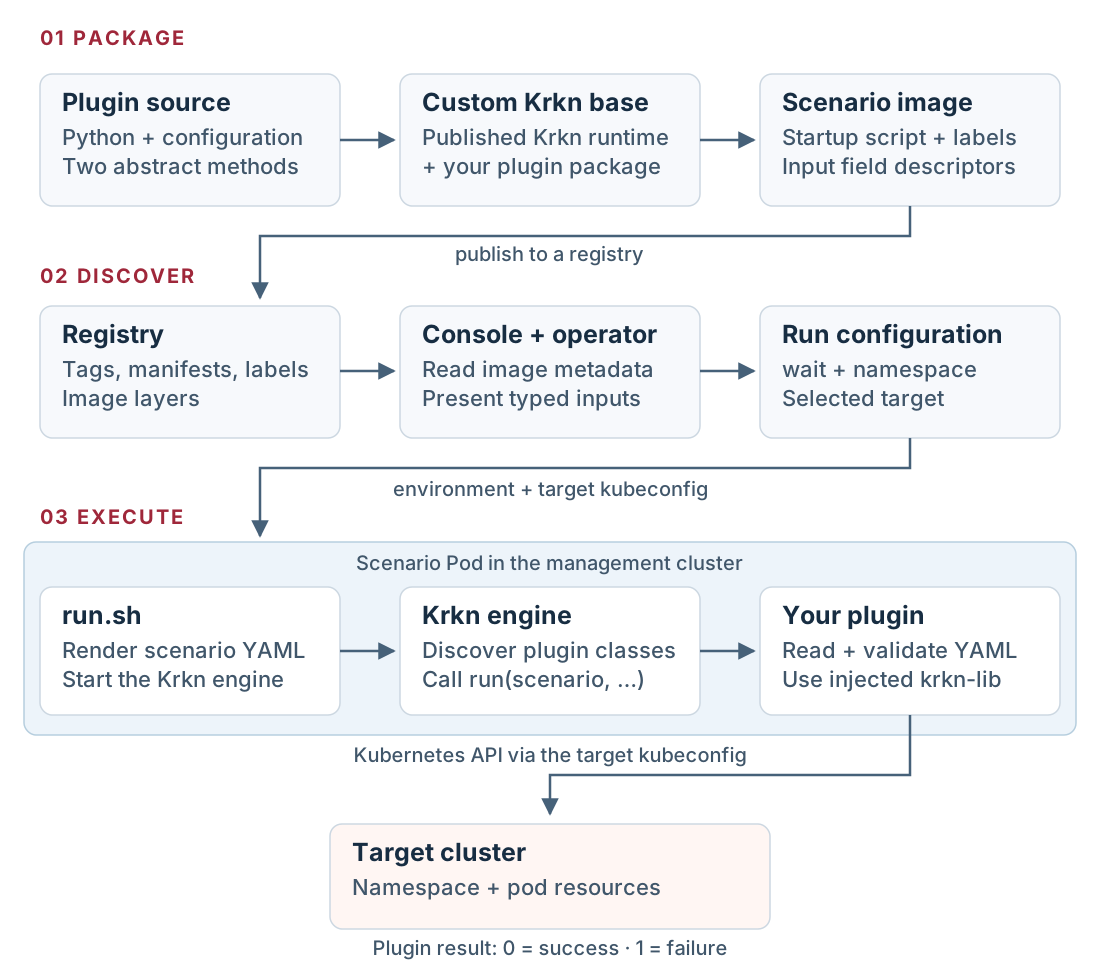
The same image connects discovery, configuration, and execution. Select the diagram to view it at full size.
Discovery reads the image
The registry stores both the image layers and the image configuration containing
its labels. Clients use registry APIs to read tags, manifests, and configuration
blobs. krknctl.is_a_scenario="true" identifies a scenario, and
krknctl.input_fields describes its inputs.
There is no separate scenario catalog database to update. Kubernetes resources still store operator configuration, credentials, and run state. A registry providing the catalog does not mean the platform is stateless.
The input metadata is a JSON array of Krkn field descriptors. Its name,
variable, and type properties connect a user-facing input to a container
environment variable. It is not a general-purpose JSON Schema document. See
the image contract reference.
The operator schedules the runner
The console reads scenario metadata through the operator API, presents inputs, and submits a run. The operator resolves the scenario image, checks its signature according to the configured policy, and creates the scenario Pod in the operator’s management cluster.
For the operator version used in the lab, the container receives:
- The image reference resolved to an immutable digest.
- Environment variables derived from the chosen parameters.
- The selected target’s kubeconfig and any configured file mounts.
- An image pull secret when the scenario uses a saved private registry.
The console calls these executions jobs. In this implementation the controller
creates Pods directly; a console job does not imply a Kubernetes Job object.
The node’s kubelet asks its container runtime to pull the image. Registry access
from the operator and image pulls from containerd are separate connections.
Enabling HTTP in the operator’s registry settings does not change containerd.
This distinction explains why a scenario can appear in the console while its
Pod remains in ImagePullBackOff.
The image turns inputs into scenario configuration
In the demo, the user-facing wait input maps to WAIT_SECONDS; namespace
maps to NAMESPACE. The image’s /home/krkn/run.sh renders these variables into
a scenario YAML file and selects that file in the Krkn configuration:
kraken:
  kubeconfig_path: /home/krkn/.kube/config
  chaos_scenarios:
    - dev_demo_scenarios:
        - scenarios/dev_demo.yaml
The Krkn entrypoint starts the engine with that configuration. The plugin
factory discovers Python classes, and get_scenario_types() maps
dev_demo_scenarios to DevDemoScenarioPlugin. For each configured scenario
file, the engine passes the path to run() together with the telemetry objects.
The plugin uses lib_telemetry.get_lib_kubernetes() to interact with the target
cluster. The mounted kubeconfig determines that target; the location of the
scenario Pod does not.
The container contract also supports other implementations
A scenario can implement its behavior in a shell script or another language.
It still needs the metadata and runtime paths expected by its client. In
particular, the operator used in this lab invokes /home/krkn/run.sh through
/bin/bash -c, so an arbitrary image entrypoint alone is insufficient.
The Python path adds Krkn’s plugin discovery, telemetry integration, and
scenario lifecycle. A plugin should use existing krkn-lib helpers, contain
its exceptions, and return 0 on success or 1 on failure. Scenarios that
modify resources also need a recovery strategy; the demo only reads resources.
What changes when you publish an update
Editing Python source does not change an already built image. Rebuild the custom base image after plugin edits, then rebuild and push the scenario image. Changes to input metadata, startup scripts, or templates require rebuilding the scenario image as well.
Existing Pods retain the image digest they were created with. Start a new run after publishing a new tag value, and confirm the resolved image in the run details. Do not assume that a retry used the updated image without checking its digest.
Continue with the hands-on lab.